Start-Up
- Pay attention to the mains voltage. The voltage of the power source must match the voltage specified on the rating plate of the power tool.
- Products that are only sold in AUS and NZ: Use a residual current device (RCD) with a nominal residual current of 30 mA or less.
When operating the power tool using a mobile generator that does not have sufficient reserve capacity or an adequate voltage control system with inrush current boost converter, loss of performance or atypical behaviour may occur upon switch-on.
Please check the suitability of the power generator you are using, particularly with regard to the mains voltage and frequency.
(GWS 12-125 P)
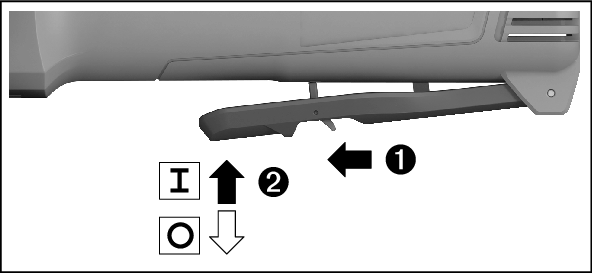
To start the power tool, push the unlocking lever (5) to the rear and then push the on/off switch (3) upwards.
To switch off the power tool, release the on/off switch (3).
- Always check abrasive tools before using them. The abrasive tool must be fitted properly and be able to move freely. Carry out a test run for at least one minute with no load. Do not use abrasive tools that are damaged, run untrue or vibrate during use. Damaged abrasive tools can burst apart and cause injuries.
(GWS 12-125 S)
To start the power tool, push the on/off switch (3) forward.
To lock the on/off switch (3) in position, push the on/off switch (3) forward and down until it clicks into place.
To switch off the power tool, release the on/off switch (3); or, if the switch is locked, briefly push the on/off switch (3) backward and down and then release it.
- Always check abrasive tools before using them. The abrasive tool must be fitted properly and be able to move freely. Carry out a test run for at least one minute with no load. Do not use abrasive tools that are damaged, run untrue or vibrate during use. Damaged abrasive tools can burst apart and cause injuries.

The electronic soft start limits the torque when the power tool is switched on and enables a smooth start-up.
Note: If the power tool runs at full speed immediately after being switched on, this means that the soft start and restart protection mechanisms have failed. The power tool must be sent to the after-sales service immediately; see the "After-Sales Service and Application Service" section for addresses.

(GWS 12-125 S)
You can preselect the required speed using the speed preselection thumbwheel (6), even during operation. The information in the table below describes the recommended values.
|
Material |
Application |
Application tool |
Thumbwheel position |
|---|---|---|---|
|
Metal |
Removing paint |
Sanding sheet |
2–3 |
Metal | Brushing, removing rust | Cup brush, abrasive disc | 3 |
Stainless steel | Grinding | Grinding disc/fibre disc | 4–6 |
Metal | Rough grinding | Grinding disc | 6 |
Metal | Cutting | Cutting disc | 6 |
Stone | Cutting | Diamond cutting disc | 6 |
The values specified for speed levels are guide values.
- The rated speed of the accessory must be at least equal to the maximum speed marked on the power tool. Accessories running faster than their rated speed can break and fly apart.
Level | GWS 12-125 S |
|---|---|
1 | 2800 |
2 | 3900 |
3 | 5200 |
4 | 6500 |
5 | 8100 |
6 | 11,000 |
The values specified for speed levels are guide values.